Displays
This vehicle is equipped with two display screens: a main display and a sub-display
The following items can be found on the displays:
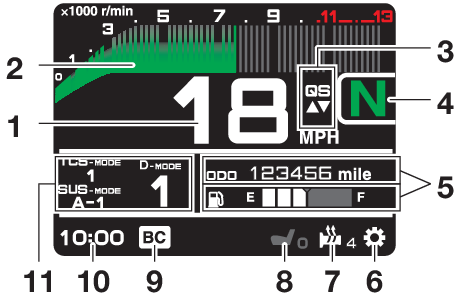
- Speedometer
- Tachometer
- Quick shift indicator “QS”
- Transmission gear display
- Vehicle information displays
- Settings MENU icon “
 ”
” - Grip warmer indicator
- Seat heater indicator (if equipped)
- Brake control icon “BC”
- Clock
- MODE display
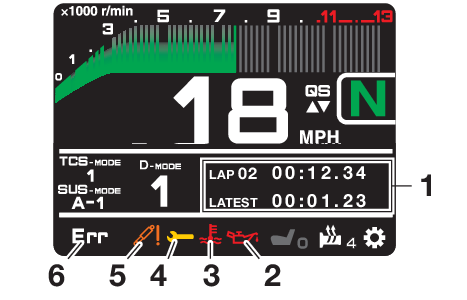
- Lap timer
- Oil pressure warning “
 ”
” - Coolant temperature warning “
 ”
” - Auxiliary system warning “
 ”
” - SCU trouble warning “
 ”
” - Error mode warning “Err” (replaces clock when activated)
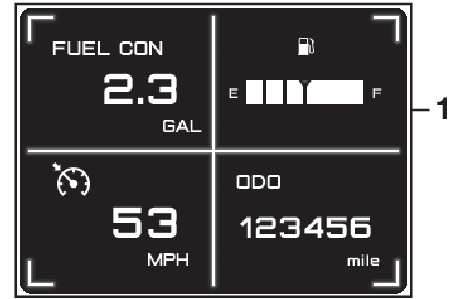
- Vehicle information displays
- This model uses thin-film-transistor liquid-crystal displays (TFT LCD) for good contrast and readability in various lighting conditions. However, due to the nature of this technology, it is normal for a small number of pixels to be inactive.
- The display units can be switched between kilometers/miles and celsius/farenheit. See “Unit” on page .
Stop the vehicle before making any setting changes. Changing settings while riding can distract the operator and increase the risk of an accident.
Speedometer
The speedometer shows the vehicle’s traveling speed.
Tachometer
The tachometer shows the engine speed, as measured by the rotational velocity of the crankshaft, in revolutions per minute (r/min).
Do not operate the engine in the tachometer red zone.
Red zone: 10600 r/min and above
Vehicle information displays
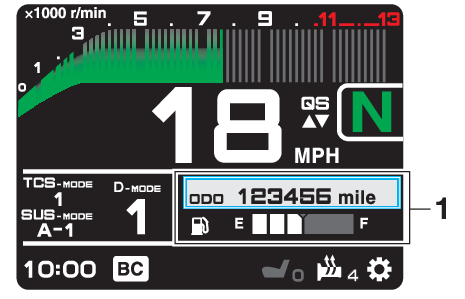
- Vehicle information displays
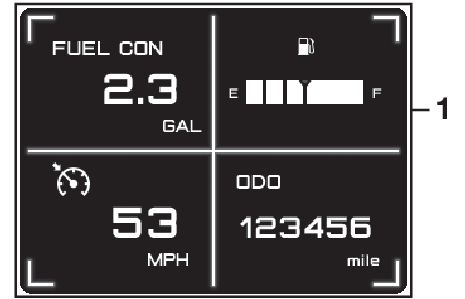
- Vehicle information displays
The six vehicle information displays can be individually set to show the following items:
- ODO: odometer
- F-TRIP: fuel reserve tripmeter (main display (upper) only)
- TRIP1: tripmeter
- TRIP2: tripmeter
- F.AVE: average fuel economy
- F.CRNT: instantaneous fuel economy
- A.TEMP: air temperature
- C.TEMP: coolant temperature
- Fuel meter
- FUEL CON: amount of fuel consumed
- TRIP TIME: running time
 : cruise control speed setting
Operate the vehicle information displays as follows:
Rotate the wheel switch to move the cursor over an information display.
Push the wheel switch inward and the selected display will highlight grey.
Rotate the wheel switch to choose a different display item.
Push the wheel switch inward to confirm the new display item.
- In LAP TIME mode, the two vehicle information displays on the main display screen are replaced by lap information.
- TRIP1, TRIP2, F-TRIP, F.AVE, FUEL CON and TRIP TIME items can be individually reset.
Odometer:

The odometer shows the total distance traveled by the vehicle.
ODO will lock at 999999 and cannot be reset.
Fuel reserve tripmeter:

When the fuel tank reserve level has been reached, F-TRIP appears automatically and begins recording distance traveled from that point.
After refueling and traveling some distance, F-TRIP will automatically disappear.
Tripmeters:

TRIP1 and TRIP2 show the distance traveled since they were last set to zero.
TRIP1 and TRIP2 will reset to 0 and begin counting again after 9999.9 has been reached.
Average fuel economy:

When using kilometers, the average fuel economy display can be set to “km/L” or “L/100km”. See page .
After resetting the average fuel economy display, “--.-” will be shown until the vehicle has traveled 1 km (0.6 mi).
Instantaneous fuel economy:

When using kilometers, the instant fuel economy display can be set to “km/L” or “L/100km”. See page .
If traveling at speeds under 10 km/h (6 mi/h), “--.-” will be displayed.
Air temperature:

The air temperature is displayed from –9 °C (16 °F) to 50 °C (122 °F) in 1 °C (1 °F) increments. The temperature displayed may vary from the actual ambient temperature.
- “--” will be displayed if the detected temperature is lower.
- “--” will be displayed if the detected temperature is higher.
Coolant temperature:

The coolant temperature is displayed from 40 °C (104 °F) to 124 °C (255 °F) in 1 °C (1 °F) increments.
- If the vehicle coolant temperature is below 40 °C (104 °F) the coolant temperature display will read “Lo”
- If the vehicle coolant temperature is above 124 °C (255 °F) the coolant temperature display will read “Hi”
Fuel Meter:

The fuel meter indicates the amount of fuel in the fuel tank. The display segments of the fuel meter disappear from “F” (full) towards “E” (empty) as the fuel level decreases. When the last segment starts flashing, refuel as soon as possible.
Fuel consumption trip meter:

Displays how much fuel has been consumed since the trip meter was last reset.
The instantaneous fuel consumption function should be used for general reference only. Do not use this figure to estimate the distance that can be traveled on the current tank of fuel.
Trip time:

Displays engine running time.
Cruise control speed setting:

Displays the selected speed setting for the cruise control system. To adjust this speed setting, see page for an explanation of the cruise control system.
To reset information display items (if able):
Rotate the wheel switch to highlight one of the six vehicle information displays.
Press the wheel switch inward to select the information display.
Rotate the wheel switch to select the desired information display item.
Press and hold the wheel switch inward until the display item is reset.
Transmission gear display
This shows which gear the transmission is in. This model has 6 gears and a neutral position. The neutral position is indicated by the neutral indicator light “ ” and by the transmission gear display “”.
MODE display
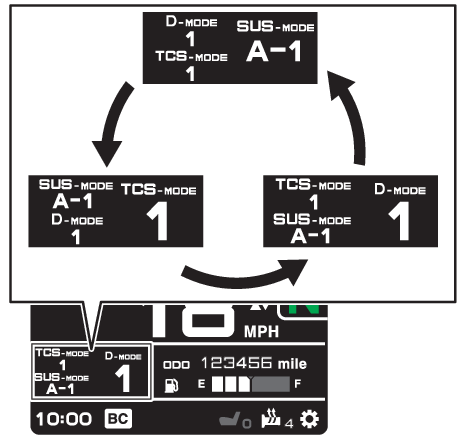
This display shows the currently selected “D-MODE”, “SUS-MODE” and “TCS-MODE” settings. The mode that is enlarged and displayed on the right can be adjusted using the MODE up/down switches. Use the “MODE” switch to rotate counterclockwise between “TCS-MODE”, “SUS-MODE” and “D-MODE”.
See page for information on “D-MODE”, “TCS-MODE” and “SUS-MODE” settings.
- When the engine trouble warning light “
 ”, the auxiliary system warning “”, or the coolant temperature warning “” are on, “D-MODE”, “SUS-MODE” and “TCS-MODE” cannot be adjusted.
 - When the SCU trouble warning “” is on, “SUS-MODE” cannot be adjusted.
- The previously selected modes will be displayed when the vehicle power is turned on.
To turn off the traction control system, select “TCS-MODE” with the “MODE” switch, then push and hold the MODE up switch until “OFF” is displayed. To turn TCS back on, press the MODE down switch (“TCS-MODE” will return to its previous setting).
- When “TCS-MODE” has been set to “OFF”, the TCS, SCS and LIF systems are all turned off together.
- The “TCS-MODE OFF” and “TCS-MODE M” settings can only be selected while the vehicle is stopped.
Quick shift indicator “QS”
When able to shift, the respective QS  or
or  turns green.
When unable to shift, QS 
 is white.
If the QS function is turned OFF, QS itself is not displayed.
The QS functions can be turned on or off in the setting MENU. See page .
Setting MENU icon “”
Choose this icon and push the wheel switch to access the settings MENU. (See page .)
Grip warmer indicator
The grip warmers can be used when the engine is running. There are 10 temperature levels. When activated, the indicator will display the temperature level from 1 (lowest) to 10 (highest).
To activate the grip warmer, use the wheel switch to highlight the grip warmer display with the cursor.
Press the wheel switch inward to select the grip warmer function.
Once selected, rotate the wheel switch up and down to adjust the temperature level.
Press the wheel switch inward to confirm the temperature level and exit the grip warmer function.
- Be sure to wear gloves when using the grip warmers.
- Do not use the grip warmers in warm weather.
- If the handlebar grip or throttle grip becomes worn or damaged, stop using the grip warmers and replace the grips.
Seat heater indicator (if equipped)
The seat heater can be used when the engine is running. There are 10 temperature levels. When activated, the indicator will display the temperature level from 1 (lowest) to 10 (highest).
To activate the seat heater, use the wheel switch to highlight the seat heater display with the cursor.
Press the wheel switch inward to select the seat heater function.
Once selected, rotate the wheel switch up and down to adjust the temperature level.
Press the wheel switch inward to confirm the temperature level and exit the seat heater function.
- Be sure to wear protective clothing that covers your hip and legs when using the seat heater.
- Do not use the seat heater in warm weather.
- If the seat becomes worn or damaged, stop using the seat heater and replace the seat.
The function of the wheel switch can be locked into grip warmer/seat heater mode by pressing and holding the wheel switch inward while the grip warmer indicator or the seat heater indicator is highlighted by the cursor.
In this mode, the temperature levels can be instantly adjusted by rotating the wheel switch up/down.
While in this mode, press the wheel switch inward to toggle between the grip warmer and seat heater functions.
To exit this mode and return the wheel switch to its normal functionality, press and hold the wheel switch inward.
The current grip warmer/seat heater settings are saved when the vehicle is turned off.
Lap timer
This stopwatch function can be activated through the settings MENU. (See page .)
Once activated, the two vehicle information displays on the main display screen are replaced with:
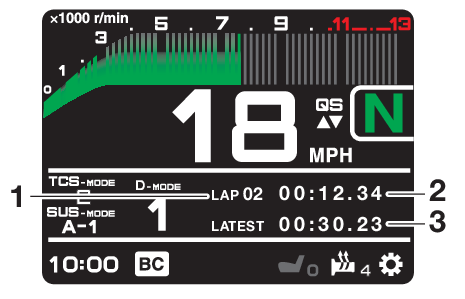
- Lap count
- Current lap time
- Latest/Previous lap time
To start the timer, push the dimmer/pass switch down towards “PASS”.
Each push of the dimmer/pass switch will increase the lap count by 1 and reset the current lap timer.
To pause the lap timer, press the wheel switch inward.
To unpause the timer, push the dimmer/pass switch down towards “PASS” and the timer will resume without counting a new lap.
To exit the lap time mode, turn it off in the settings MENU. (See page .)
- The engine must be running to start the lap timer.
- The headlight will flash when the dimmer/pass switch is pressed.
- Whenever the lap timer is paused, it can be resumed using the dimmer/pass switch.
Brake control icon “BC”
This icon is replaced by the auxiliary system warning and coolant temperature warning indicators when they are activated.
Error mode warning “Err”
When an internal error occurs (e.g., communication with a system controller has been cut off), the error mode warning will appear as follows.
“Err” and “ ” indicator light indicates an ECU error.
“Err” and the SCU trouble warning “” indicates a SCU error.
“Err” only indicates an ABS ECU error.
Depending on the nature of the error, the display may not function properly and the TCS settings may be impossible to change. Additionally, the ABS may not function properly. Use extra care when braking and have a Yamaha dealer check the vehicle immediately.
SCU trouble warning “”
This icon appears if a problem is detected in the front or rear suspension.
Auxiliary system warning “”
This icon appears if a problem is detected in a non-engine-related system.
Coolant temperature warning “”
This icon appears if the coolant temperature reaches 116 °C (241 °F) or higher. Stop the vehicle and turn off the engine. Allow the engine to cool.
Do not continue to operate the engine if it is overheating.
Oil pressure warning “”
This icon appears when the engine oil pressure is low. When the vehicle is first turned on, engine oil pressure has yet to build, so this icon will come on and stay on until the engine has been started.
If a malfunction is detected, the oil pressure warning icon will flash repeatedly.
Do not continue to operate the engine if the oil pressure is low.